|
AceFTP - Uploading a file |
| .......... | This is not a course. It is a... Tip Sheet |
| Start the programme AceFTP by clicking on Start
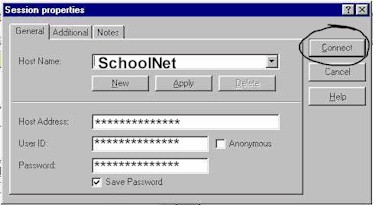
Programs AceFTP Make sure that the Host Name (SchoolNet in this case) is selected and then click on Connect.
Once you have been logged on to the Web Server you will see the following screen:
Use the You can click on a folder or a file i.e. you can upload a folder or a file. If
you upload a folder, all the files in that folder will be uploaded as well. Click
on all the files and folders that you want to upload and then click on the Make a new folder If you want to create a new folder on the Web server, use the |

 s
s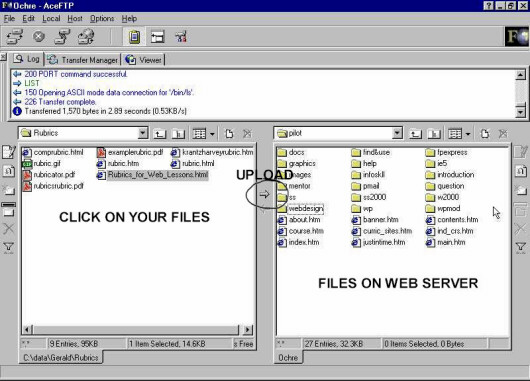
 and
and  buttons and other normal file browsing to find the folder of files that you want to upload
to the Web server. Your files appear on the left hand half of the screen.
buttons and other normal file browsing to find the folder of files that you want to upload
to the Web server. Your files appear on the left hand half of the screen.  button
in the middle of the screen (circled above).
button
in the middle of the screen (circled above). button
on the extreme right of the screen. Give the folder a name. Use only small letters. To open
that folder, double click on the folder name in
the right hand part of the screen.
button
on the extreme right of the screen. Give the folder a name. Use only small letters. To open
that folder, double click on the folder name in
the right hand part of the screen.