|
MS Excel 97 - Copy / Cut and Paste |
| .......... | This is not a course. It is a... Tip Sheet |
| Copying and Pasting The concept of copying (or cutting) and pasting data is the same as it is for any programme. You follow the basic steps
 (or Cut icon) (or Cut icon)  - the keyboard method is Ctrl-C (for
copy) and Ctrl-X (for cut)
- the keyboard method is Ctrl-C (for
copy) and Ctrl-X (for cut) When using the spreadsheet you are also able to paste the formula of one cell to many different cells. The concept remains unchanged. |
|
Step One 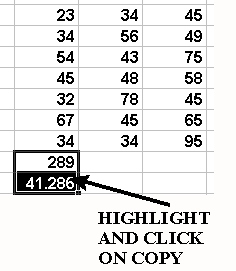 |
|
Step Two 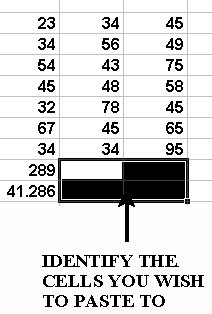
|
|
Step Three
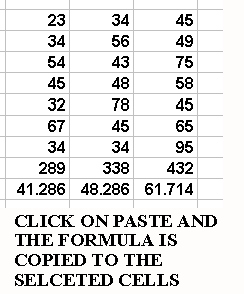 |
|
| Try this yourself. You will notice
that the formula changes as you copy it to a different column or row. For instance, if the
original formula was =A3+A4 (referring to column A), and you copy the
formula to column B, the formula will automatically change to =B3+B4. Similarly if the formula was =A3*B3 (referring to row 3), and you copy the formula to row 4, the formula will automatically change to =A4*B4 |
