|
MS Excel 97 - Using a formula
|
|||||||||||||||||||||
| .......... | This is not a course. It is a... Tip Sheet |
|||||||||||||||||||||
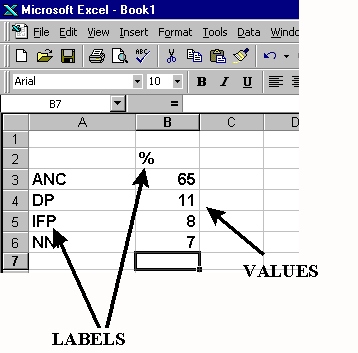
| Labels and values The entering of data into a spreadsheet is just like word processing, but you have to first click on the cell in which you want the data to be placed before typing the data. All words describing the values (numbers) which you enter are called labels. The numbers which you enter, and which can later be used in formula's, are called values. Notice also that the labels are all left justified and the values are all right justified in their cells. |
 |
|||||||||||||||||||||
| Simple Formula:
Place the cursor in the cell in which you want the answer (result of the formula) to appear, and press Enter once you have typed the formula All formula's start with an =
sign
Use BODMAS i.e. Brackets first, then Division, Multiplication, Addition and Subtraction e.g. =((A2-B2)*3)-100 Notice that individual sums within a sum are bracketed and appear at the beginning of the formula. |
||||||||||||||||||||||
|
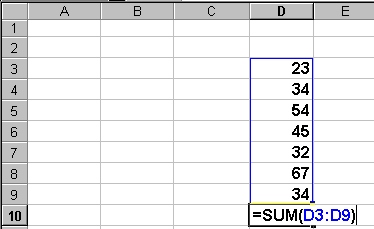
These formula's are used for working with long lists of numbers. A typical range formula looks like this: =SUM(A3:A30) SUM is a function, meaning that it sums (adds up) the
list of numbers |
||||||||||||||||||||||
| =SUM(D3.D9) Adds list of values from cell D3 to cell D9
|
||||||||||||||||||||||
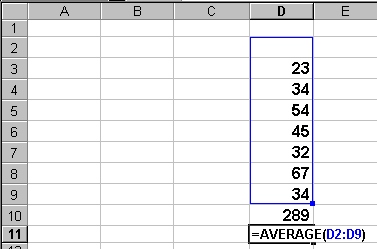
| =AVERAGE(D3:D9)
|
||||||||||||||||||||||
|
There are many formula functions that you could explore with time. As an educator you could you are most likely to use SUM and AVERAGE. Here are just a few more:
|
||||||||||||||||||||||
| Notice that you must have selected an empty cell before typing the formula. The answer will then appear in that cell. |
||||||||||||||||||||||