|
MS Front Page Express - Start |
| .......... | This is not a course. It is a... Tip Sheet |
| See also: To
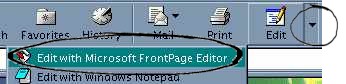
set up an icon for FrontPage Express on your desktop Starting Front Page Express FrontPage Express forms part of the Web browser Internet Explorer. One does not therefore start this programme in the conventional way by clicking on an icon (although you could create an icon - see below). To start FrontPage Express, first start Internet Explorer. You will notice the large Edit button (circled) to the right of the large icons on the screen.
Click on the Edit button (If FrontPage Express does not start, click on the down arrow to the right of it)
Alternatively, you could start FrontPage Express by clicking on the File menu
To set up an icon for FrontPage Express on your desktop Go to your desk top Double-Click on My Computer Double-Click on the Program Files folder Double-Click on the FrontPage Express folder Double-Click on the Bin folder Right-Click on fpxress Click on Copy Return to your desktop and Right-Click at the position where you would like the icon to appear. Click on Paste |