|
Internet Explorer - Navigating the Web |
||||||
| .......... | This is not a course. It is a... Tip Sheet |
||||||
| Finding one's way around the World Wide Web
(WWW) is sometime referred to as surfing the Web. There are several possible ways to navigate (move around) the WWW.
Sometimes a picture, or parts of a picture, can also be a link to other sources of information. For instance, move you mouse of the SchoolNet logo and you will see a hand. Clicking on the logo will take you to the SchoolNet web site.
Sometimes people who want to sound important use the term URL instead of web site address. They mean the same thing.
The address line appears at the top of the page,
but below the icons. Once you know the address of a web site you can type it in this line
and press the Enter key. You do not have to type in the http://
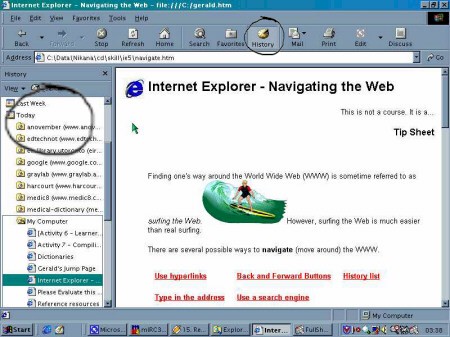
Firstly, in the large icon bar you will see a History icon (circled below). Click on this and you will see a list of recently-visited web sites (circled on the left in the image below). Click on the one you want to re-visit.
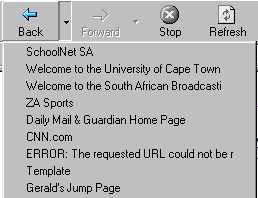
Secondly, the back and forward buttons have
little arrows to their right.
|
|||||||

 However, surfing the Web is much
easier than real surfing.
However, surfing the Web is much
easier than real surfing. changes to a pointing hand
 on the
screen as you move your mouse pointer over that area of the screen. When this happens, you
can click on the left-hand mouse button and information from another web page or web site
will appear on your screen.
on the
screen as you move your mouse pointer over that area of the screen. When this happens, you
can click on the left-hand mouse button and information from another web page or web site
will appear on your screen.

 and Forward
  buttons
on the left hand side of the icon bar allow you to move backwards and forwards
amongst pages which you have already opened in the current session of browsing.
buttons
on the left hand side of the icon bar allow you to move backwards and forwards
amongst pages which you have already opened in the current session of browsing.