|
Internet Explorer - Saving online costs |
||
This is not a course. It is a... Tip Sheet |
|||
| When you are browsing the World Wide Web, you
are using the telephone and that is costing you normal telephone costs. If you school is
far from the Internet provider that you school is using, these costs could be quite high.
Here are some hints to help you save the amount of time you spend online. Saving time
online is saving money.
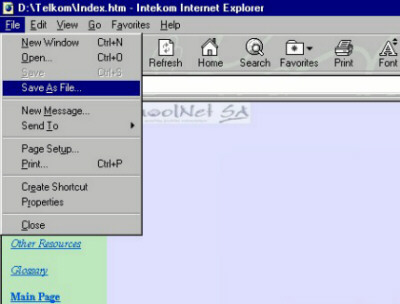
Instead of reading long documents while online, glance through it quickly and if it looks even slightly useful to you, save it to your local storage disk. Note that it will not save you much in terms of costs to print the document, since printing also costs money. Once you have saved it, you can read it offline once you have ended the Internet connection. This is how you do it: |
|||
| Click on the File Menu
Click on Save As File This will be Save As in newer versions of IE.
In newer versions of IE (IE 5) you will find that the text and the images save. Read the saved file in IE. In older versions only the text will save.
|
|||
|
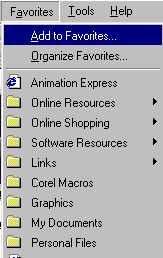
If the web site only has value when seen online (as opposed to reading the content offline) you can save it as a Favourite. This will help you to return to the web site with one click once you are online again on another occasion. Favourites are saved on the local computer where you are browsing. Therefore, if you are on a network in a computer room, you would have to sit at the same computer to be able to recall your favourites. This is how you save favourites:
In order to use the favourite at a later date, simply click on the Favorite icon or menu and click on the description of the favourite in the list that appears in the pop-up screen. |
 icon.
icon. button