PowerPoint - Viewing the presentation on paper
This is not a course. It is a ...
Tip Sheet
Viewing your presentation on paper
Options are available before you print
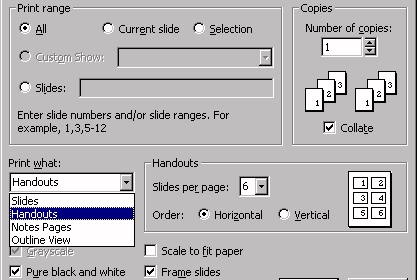
Click in the File menu
Click on Print
- Individual Slides can be printed as transparencies. Be careful not to have a coloured background as on a transparency it can detract from the main focus.
- Handouts can be printed for the audience, usually 6 per slide, suggested in Pure black and white, with Frame slides.
- Notes Pages are printed for the presenter with their own notes, written for each slide in Normal View.
- Outline View can be printed just showing the text version of the presentation, usually for the presenter.