|
MS Word 97 - Formatting text on the page |
|||||||||
| .......... | This is not a course. It is a... Tip Sheet |
|||||||||
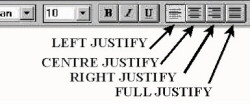
Text JustificationWhat is justification? This line is left justified. The line is centre justified This line is right justified. Full justify is when your paragraph has both left and right justify at the same time.
|
||||||||||
|
||||||||||
|
||||||||||

 To
reverse the process click on the Decrease
To
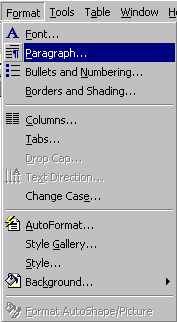
reverse the process click on the Decrease| Click on Format Click on Paragraph |
 |
| Go to Line spacing: Click on the black triangle Choose the spacing you want by clicking on it Click on OK |
 |
| Left Centre Text Right |
Indent Paragraph |
Line Spacing |
Page Margins |
Page Orientation |
Page Margins
| The default (normal) margin around the page
is 2.5cm (1 inch) on top and bottom and 3.17cm on the left and right. You can adjust these
by Clicking on File
Use the up and down arrow to adjust the value of the margin or click on the value itself and change it by typing in a value of your choice. |
 |
| Margin settings apply to the whole page unless you choose the option to Apply to: and then click on This point forward |  |
Page Orientation
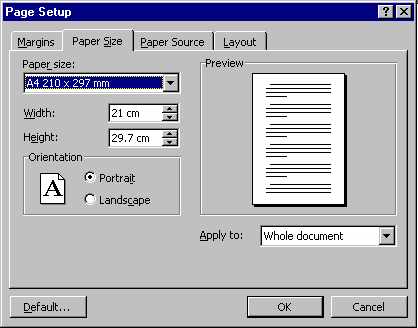
| Normal paper as it emerges from the printer is
orientated as Portrait. To turn the paper sideways for very wide documents, you
use Landscape. Click on File Click on Page Setup Click on Paper Size Choose either Portrait or Landscape by clicking in the circle to the left of the word in the Orientation section of the pop-up screen. |
 |