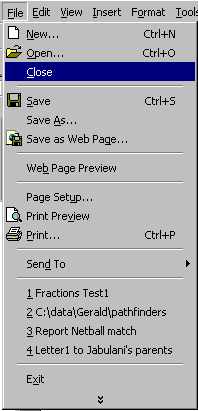
To close a file (assuming that you have saved it) Click on File
Click on Close
There is not normally an icon available on the toolbar for
this function. The other way in which you can close a file is to use the buttons on the
very top right of the screen. Notice that one set of buttons appears in the blue status
bar. This is not the set of button that I am referring to (these buttons
refer to the whole programme and that X will close the Word programme).
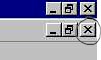
We are referring to the
second row of buttons in the grey area. We have attempted to place a circle around the X
that we are referring to. The second row of buttons refer to the document with
which you are working. If you want to close the document, carefully click on that X
in the second row. |